Local AI vs. Cloud AI: You're Not Choosing a Model. You're Choosing a Tradeoff.
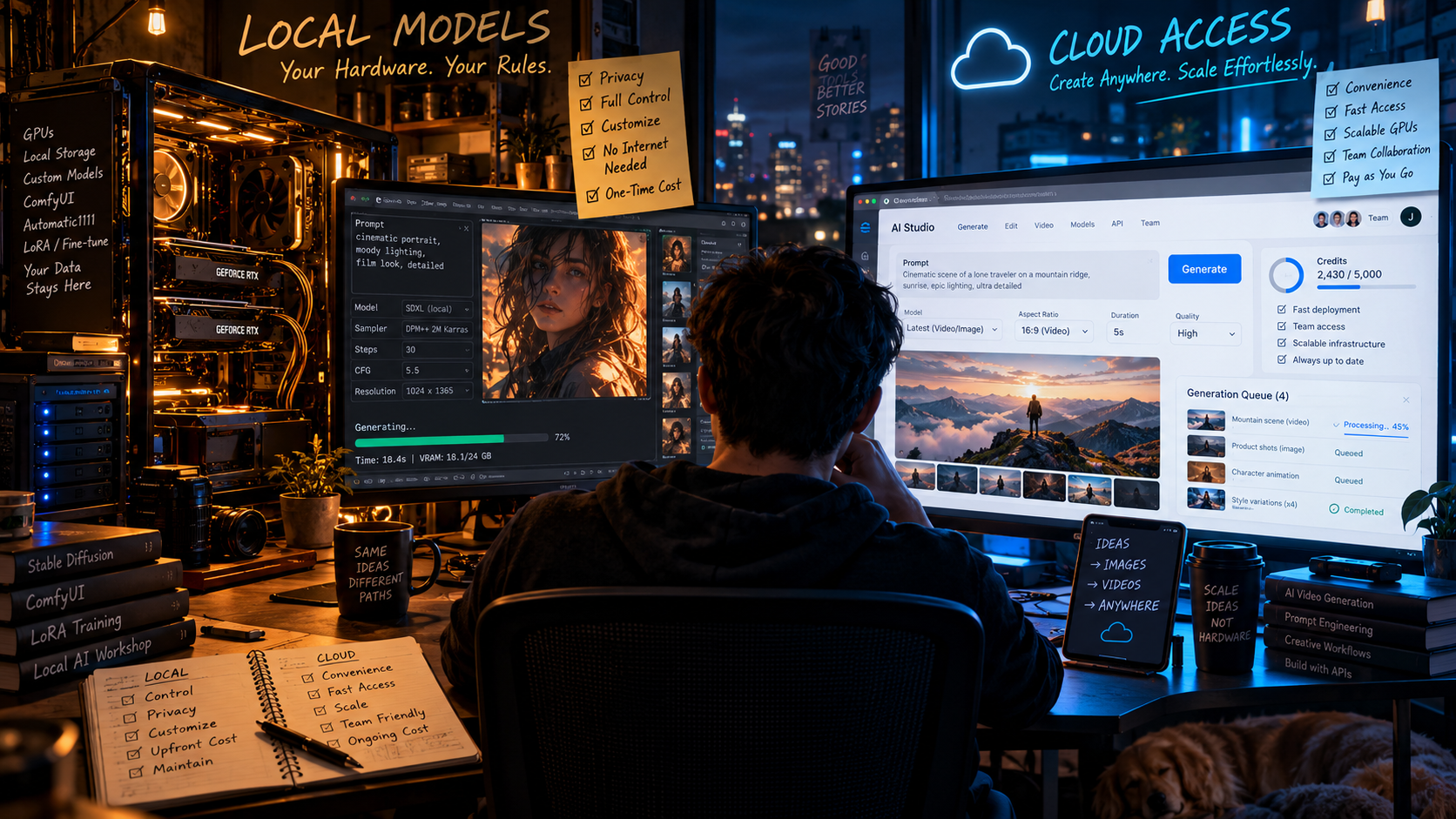
Running AI on your own machine sounds like freedom. Using a cloud model sounds like convenience. In practice, the best choice depends on what you are making, what you are willing to manage, and what you need the model to know.
For a long time, “running AI locally” sounded like something you did because you enjoyed installing dependencies at 2 a.m.
The serious models lived in the cloud. You opened a website, typed a prompt, and somebody else’s enormous pile of GPUs did the work.
That distinction is getting less useful.
Today, a normal person can download an app like LM Studio or Ollama, pull down a model, and run surprisingly capable AI on a laptop or desktop. Once the model is on the machine, some setups can operate entirely offline. At the same time, the largest and most capable models still tend to be easier to access through cloud services, where you do not have to think about VRAM, quantization, drivers, model files, or whether your computer sounds like it is preparing for takeoff.
The question is no longer whether local AI is “real AI.”
It is which compromises you want to own.
First, what does “local” actually mean?
A local model runs inference on hardware you control instead of sending the prompt to a remote provider to generate the answer.
That hardware might be the MacBook sitting in front of you, a gaming PC with a large GPU, a workstation under your desk, or even another computer you own elsewhere on your network. LM Studio, for example, can run downloaded models entirely offline and can also expose them through a local server. Ollama does something similar through a command-line and API-oriented workflow. LM Studio offline operation · Ollama
There is an important vocabulary trap here. Local does not automatically mean open source. To run a model yourself, you generally need access to its weights, but models with downloadable weights can have very different licenses and different levels of openness. “Open model,” “open weights,” and “open source” are not interchangeable labels. LM Studio model basics
A cloud model is the opposite arrangement. The model runs on infrastructure controlled by a provider, and you access it through a website, app, API, or other service. You do not need enough memory to load the model because the provider does.
That sounds like a technical difference. In practice, it changes almost everything about the experience.
Local wins on control
The most obvious advantage of local AI is that the model is yours to run.
If the files are on your machine and the software does not need a network connection, the model does not disappear because a provider changes a product name, removes a version, alters a rate limit, or decides a feature belongs in a different subscription tier.
You can also choose the exact model and often the exact quantized version you want to keep using. That matters more than it sounds. Cloud products improve quickly, but “improvement” can also mean behavior changes. A workflow that produced exactly the tone you wanted last month may feel slightly different after a provider updates the model behind the interface.
With local models, you can keep the old one.
That is useful for creative work where consistency matters. If I build a prompt library, character workflow, tagging system, local research assistant, or classification process around a particular model, there is real value in knowing that the engine underneath it will still be the same engine tomorrow.
You can also modify the surrounding workflow much more aggressively. Local model ecosystems support custom system prompts, retrieval from your own files, adapters such as LoRAs, custom pipelines, different quantization levels, local APIs, and model swapping without waiting for a commercial interface to expose the control you want.
Cloud products increasingly offer powerful customization too, but you are still operating inside someone else’s product decisions.
Privacy is a real advantage, but only if the whole workflow is local
The privacy case for local AI is straightforward: if the model, documents, and inference all stay on your machine, there may be no reason for your prompt or source material to leave the device at all.
LM Studio explicitly says that once a model has been downloaded, local chats, document processing, and local-server requests can operate offline, with prompts and documents remaining on the device. LM Studio offline operation
That can be valuable if you are working with unreleased scripts, private business documents, legal drafts, proprietary code, client material, personal archives, or anything else you would rather not transmit unnecessarily.
But “I use a local model” does not automatically mean “nothing leaves my computer.”
If your local assistant calls a web-search service, sends a request to a cloud embedding API, uses a remote speech model, invokes an online image generator, or hands part of the workflow to a cloud agent, that portion is no longer local. Privacy depends on the entire pipeline, not the location of the chat window.
Cloud does not automatically mean bad privacy either. Some hosted services offer zero-data-retention or enterprise controls, and policies differ substantially by provider and plan. The point is that local inference gives you the option to keep a workflow physically contained in a way a remote model cannot.
For some people, that matters a little.
For others, it is the entire reason to run locally.
Cloud still wins when you simply want the biggest brain available
The strongest argument for cloud AI is brutally simple: somebody else owns much better hardware than you do.
The largest frontier models can require enormous amounts of compute and memory. A provider can spread that workload across specialized infrastructure while you access the result from a phone.
Locally, the model has to fit the resources you actually own.
For language models, memory-efficient formats and quantization have made that problem dramatically easier. Tools such as llama.cpp support a range of low-bit quantization formats, CPU and GPU inference, Apple Silicon, NVIDIA and AMD GPUs, and even hybrid CPU/GPU execution when a model is larger than available VRAM. Hugging Face’s quantization tools can likewise reduce model memory requirements substantially; its documentation notes that 8-bit loading can roughly halve memory use, while 4-bit approaches can go further. llama.cpp · Hugging Face quantization
That is what makes local AI practical.
It is also the compromise.
A smaller or heavily quantized model may be wonderful at summarizing notes, rewriting copy, generating ideas, extracting structured data, tagging files, or answering questions over a private document collection. It may still be noticeably worse than a top cloud model at difficult reasoning, complex coding, long-horizon agent work, obscure knowledge, or multimodal tasks.
The gap changes constantly, but the basic rule is stable: cloud lets you rent hardware and capability that would be ridiculous to keep under your desk.
Video makes the hardware difference impossible to ignore
For creators, the local-versus-cloud argument gets much more dramatic once you move beyond text.
Image generation can run comfortably on increasingly ordinary hardware, especially with optimized or quantized models. Video is another story.
Modern video models can contain billions of parameters and consume huge amounts of memory. Hugging Face’s Diffusers documentation notes that newer video pipelines can exceed typical consumer GPU memory, and even optimized workflows often rely on techniques such as model offloading, quantization, and moving layers between GPU and CPU. Some 10B-plus video models can be brought down into roughly the low-teens of gigabytes of VRAM with aggressive offloading, but that reduction comes with tradeoffs in speed and complexity. Hugging Face video generation · Hugging Face memory optimization
This is where “free local generation” can become a misleading phrase.
Yes, you may not be paying a per-generation API fee. But you are paying with hardware, electricity, storage, heat, setup time, render time, and occasionally a Saturday afternoon spent trying to understand why CUDA has personally betrayed you.
A cloud video model lets you skip most of that. Upload the image, write the prompt, let a data center suffer on your behalf.
For someone generating a handful of clips, that may be the obviously better trade.
For someone generating hundreds or thousands of images, experimenting with custom pipelines, training adapters, or repeatedly processing a large internal library, owning the compute can start to make much more sense.
“Local is cheaper” depends entirely on how much you use it
Cloud AI usually has a visible meter. You pay through a subscription, credits, tokens, images, seconds of video, or some combination of them.
Local AI hides the meter inside the computer.
Once you already own capable hardware, the marginal cost of another local text generation can feel close to free. There is no token invoice arriving afterward. You can run the same task ten thousand times without asking whether each pass is worth another few cents.
That changes behavior.
You experiment more. You can generate embeddings for a large archive, classify tens of thousands of records, run background transformations, test prompts aggressively, or build automations that would feel wasteful if every iteration had an obvious API cost attached.
But if you buy a $3,000 or $5,000 machine specifically to avoid a $20 subscription, you have not discovered free AI. You have invented accounting.
Hardware only wins economically when you use it enough, value the control enough, or need something the cloud service does not give you.
The cheapest answer for a casual user is usually cloud.
The cheapest answer for a heavy user can eventually be local.
The interesting answer is that most people never calculate where that crossover actually is.
Local AI also changes what failure feels like
Cloud products are designed to hide infrastructure. When they work, that is wonderful. You ask for something and it happens.
When local AI breaks, you own the problem.
A model may not fit memory. A backend may not support your GPU correctly. A new quantization may be slower than expected. A workflow may require a specific Python package. A model card may assume you know what an inference backend is. You can absolutely get to the point where local AI feels as easy as opening an app, but the complexity has not vanished. Somebody has simply packaged it well.
LM Studio is a good example of how far that packaging has come. It lets users discover downloadable models, load them into memory, chat through a conventional interface, work with local documents, and expose local models through an API. Ollama has similarly made pulling and running open models feel much closer to installing ordinary software than building a research project. LM Studio basics · Ollama download
That usability improvement is probably the biggest reason local AI matters now.
The technology did not suddenly become possible.
It became normal enough that people without an ML engineering background can actually use it.
Cloud models know how to be products
There is another advantage to online AI that raw model comparisons often miss: the best cloud systems are not just models anymore.
They come wrapped in products.
They can search the web, interpret files, run code, connect to external services, maintain projects, use tools, generate images, browse websites, call APIs, sync across devices, and hand work between different specialized systems.
A local model starts as an inference engine. If you want the rest, you have to add it.
That can be a disadvantage if you just want something to work.
It can be an advantage if you want to decide exactly how it works.
This is the recurring pattern in the whole local-versus-cloud argument: convenience and control tend to move in opposite directions.
The best answer is increasingly “both”
The most interesting development is that local and cloud are no longer separate camps.
LM Studio now supports local, remote, and cloud model choices from the same environment. Ollama similarly supports models running on your own hardware as well as cloud-hosted models. The interface can stay familiar while the compute moves depending on the job. LM Studio model options · Ollama
That is probably where most sophisticated workflows are heading.
Use a small local model to classify files, summarize private documents, rewrite repetitive copy, search an archive, or handle high-volume tasks where sending every request to a premium model would be wasteful.
Use a cloud model when the problem is difficult enough that model quality matters more than marginal cost.
Use local image generation when you need hundreds of iterations or deep workflow control. Use hosted image or video systems when the model you want would melt your computer.
Keep sensitive source material local when possible, and send only the minimum necessary context to a remote model when you need capabilities your hardware cannot provide.
That is not a philosophical compromise.
It is just good routing.
So which one should you use?
If your priority is maximum capability with minimum setup, use cloud.
If your priority is privacy and offline operation, local is hard to beat.
If you are doing high-volume repetitive work, local can become economically and operationally attractive.
If you want deep customization, local gives you access to parts of the stack that commercial products often hide.
If you are generating serious amounts of video, cloud will usually save you from turning hardware management into a second hobby.
If you are experimenting, learning, building strange workflows, or simply want to understand what these models actually are instead of interacting with them through a polished website, install a local runtime and try one.
You may discover that the local model is worse than the cloud model.
You may also discover that “worse” does not matter for the job you are giving it.
That is the real shift.
We are moving from a world where you chose which AI product to use to one where you can choose where the intelligence should run.
Sometimes the answer is a data center.
Sometimes it is the machine under your desk.
And increasingly, the smartest setup is knowing when to use each one.